Table of Contents
Set up webhooks
Loading last updated info...
Webhooks allow TimePro to push real-time event notifications (e.g. timesheet or invoice changes) to an external endpoint using OAuth2-authenticated HTTP POST requests.
Video Walk-through
Watch the video for a full step-to-step guide on
- How to set up webhooks in TimePro
- How to test it out
Prequisites
Before you begin, ensure you have:
- An external endpoint URL that can receive HTTP POST requests
- A Microsoft Entra ID app registration
Navigate to the Webhook Admin Page
From your TimePro tenant
- In the top navigation, go to Admin | Webhook
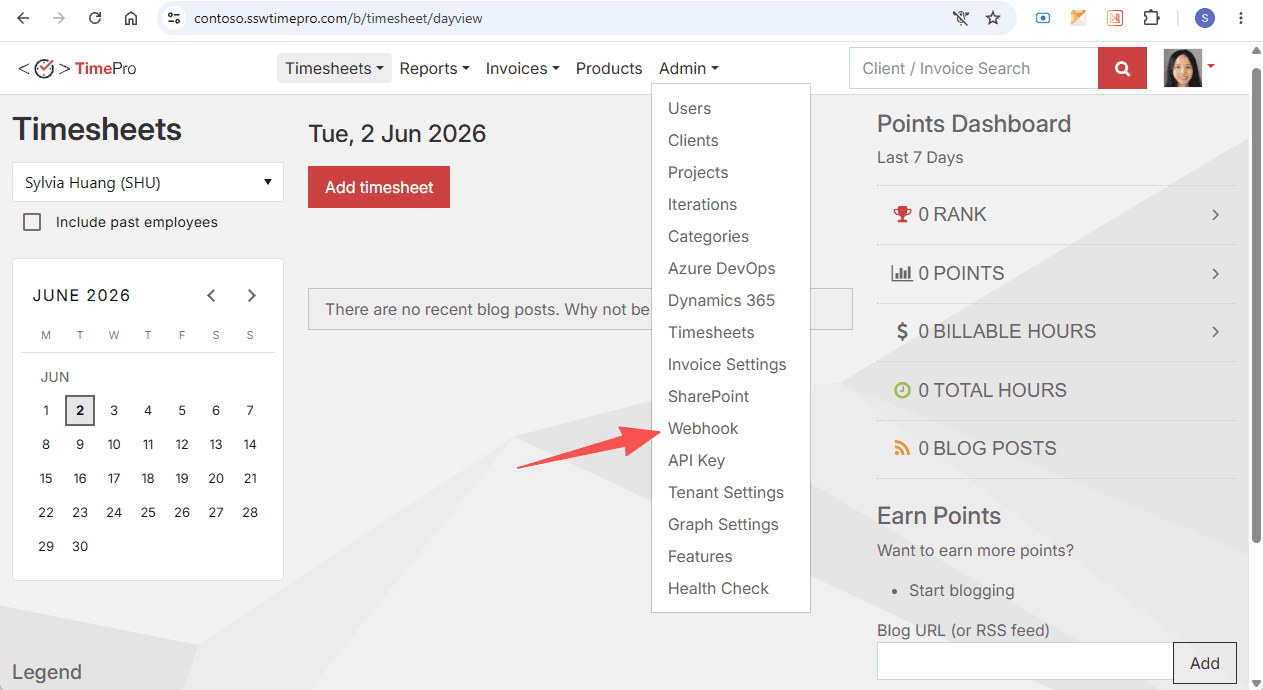 Figure: Navigate to Webhook page
Fill in the Add Subsriber Form
On the Webhook page, you will see a table listing existing webhook subscribers (empty if none exist yet).
- Click + Add subscriber button to open the Add Subsriber form
- Fill in four Entra ID fields with info from your Microsoft Entra ID app registration
- Fill in Webhook endpoint URL with endpoint that receives POST requests for your app
- Under the Subscribed Events section, tick TimePro events you want to be notified of
- Tick Enable webhook to activate the subcriber
🎉 Now you can receive notification from TimePro whenever your subscribed event occurs.