Table of Contents
Using the TimePro MCP
The TimePro MCP (Model Context Protocol) server allows you to:
- Create and manage timesheets
- Lookup clients/projects
- Handle leave requests
- and more!
All through natural language with your AI assistant.
MCP Configuration
Before configuring the MCP server, install the TimePro CLI as a global tool:
Then authenticate with your TimePro tenant:
This makes the tp command available system-wide, which the MCP server needs to run.
Setting Up in VS Code (Copilot)
Add to .vscode/settings.json or your user settings:
Other AI Agents
The MCP server works with any MCP-compatible AI agent. See the TimePro CLI README for configuration examples for:
- Claude Code - Add to
~/.claude/settings.json - Codex (OpenAI CLI) - Add to your Codex MCP config
Creating a Timesheet with MCP
Once configured, you can ask your AI agent to create timesheets using natural language:
 Figure: Creating a timesheet through the TimePro MCP + Claude Code
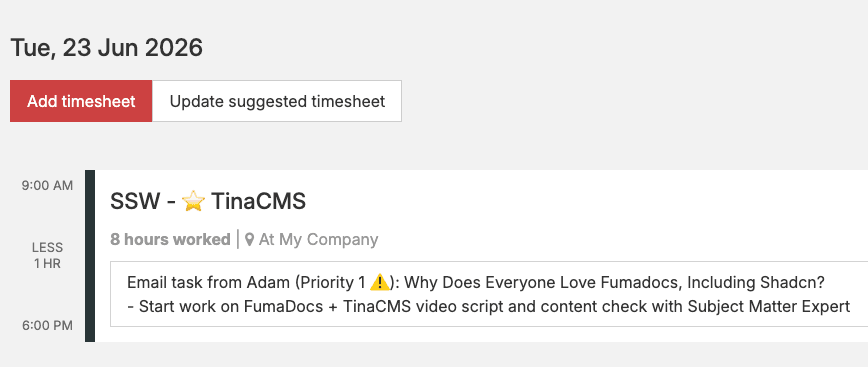 Figure: ✅ Timesheet created using previous prompt
Example prompts:
- "Create a timesheet for today - I worked on the Northwind Traders app from 9am to 5pm with a 1 hour lunch break"
- "Log 4 hours of billable work on Project X this morning"
- "I worked from home today on internal tooling"
The AI agent will use your repo mappings to auto-detect the client and project, check your billing rate, and apply your location defaults.
Other MCP Capabilities
The MCP server exposes several tool groups:
| Tool Group | What You Can Do |
|---|---|
| Timesheet | View, create, update, delete timesheets; accept suggestions |
| Lookup | Search clients, list projects, check billing rates |
| Leave | Create leave requests, list upcoming/past leave, cancel requests |
| Accounting | View invoices, receipts, credit notes, prepaid status (read-only) |
| Prepaid | Check prepaid drawdown totals and status |
Example prompts for other features:
- "What are my timesheets for this week?"
- "Accept the suggested timesheet for Monday"
- "What's my billing rate for Northwind?"
- "Show my upcoming leave"
- "Create a leave request for next Friday - Annual Leave"
For a complete list of available commands and capabilities, see the TimePro CLI documentation.
YakShaver Integration
Coming soon - Integration with YakShaver for automated timesheet suggestions based on your development activity.